
TrueValue Office Manager
LaunchedRun everyday office work.
Office Manager
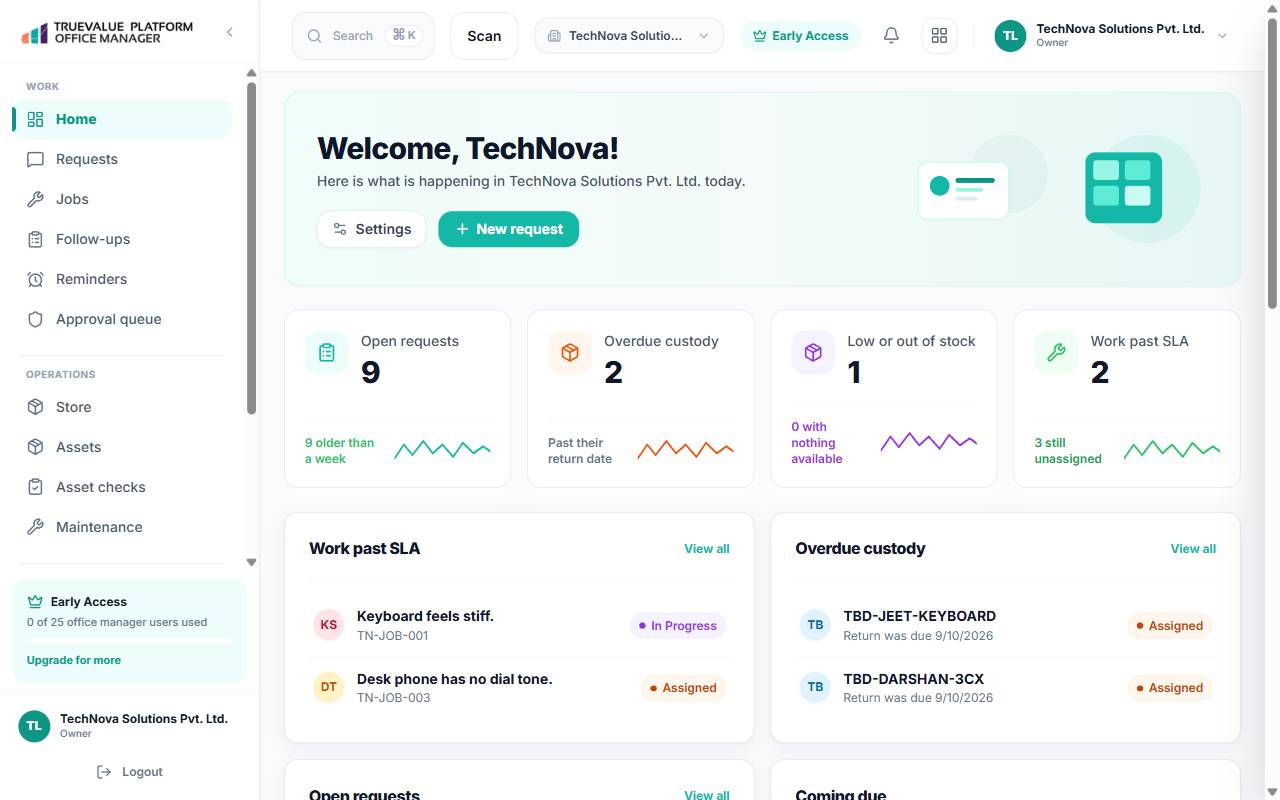
Run everyday office work: sites, people, assets, stock, and office spend.
Start with your requirements
Bring the work.
Bring the questions.
Use the demo conversation to explore your team’s requirements for TrueValue Office Manager.
Manage facility staff, office locations, access cards, and site administrators across branches.
What the work covers.
Run everyday office work: sites, people, assets, stock, and office spend.
Explore everything in Office ManagerAsset Inventory
Company laptops, office equipment, and furniture custody records with serial tags.
Desks & Rooms
Meeting room reservations, hot-desking allocations, and shared resource schedules.
Visitor Sign-In
Reception guest registration with digital sign-in, visitor badges, and host alerts.
Service Requests
Facility repair tickets, cleaning requests, maintenance dispatch, and vendor logs.
Features & Capabilities
Facility management and operational coordination.
Oversee physical workspaces, asset inventory, visitor check-in, and vendor contracts.
Asset & Hardware Inventory
Log company laptops, office equipment, and furniture with assigned serial numbers and custody records.
Room utilization optimization freed up 4 hours daily capacity
Meeting Room & Desk Booking
Coordinate shared office resources, meeting room reservations, and hot-desking schedules.
Visitor Sign-In & Badges
Register guests and vendors at reception with automated host notifications and check-in logs.
Maintenance & Service Requests
Submit and track facility repair tickets, cleaning requests, and electrical maintenance tasks.
Vendor & Contract Directory
Manage landlord communications, service contracts, utility accounts, and supplier contact lists.
Targeted Audiences
Who It's For
Show which teams and business types can benefit from the product.
Sales Teams
Drive revenue and customer conversations faster with connected TrueValue Office Manager capabilities.
Marketing Teams
Track customer acquisition and campaign engagement directly connected with business operations.
HR & People Operations
Streamline employee alignment, internal workflows, and operational handoffs across teams.
Executive Management
Maintain high-level visibility across business metrics, team velocity, and organizational growth.
PROBLEM & SOLUTION
Helping Teams Stay Aligned,Without the Chaos
Many digital teams struggle with fragmented tools, unclear responsibilities, and lack of visibility over progress. TrueValue Office Manager addresses these core pain points by offering a unified, user-friendly dashboard that keeps everything connected.
Tasks are scattered across multiple platforms and unlinked tools
A centralized dashboard combines tasks, files, and updates in one clean interface
Team members often miss deadlines due to poor visibility across stages
Smart filters (Today, Upcoming, Overdue) and visual progress indicators keep everyone aligned
Lack of collaboration features slows team communication and execution
In-task commenting, mentions, and file attachments streamline async and real-time teamwork
Users feel overwhelmed by too many tasks with no clear prioritization
Color-coded tags, priority markers, and focus modes help users sort what's urgent from what's optional
Hard to track team productivity and individual operational workload
Built-in analytics provide insights on task completion, delays, and workload distribution
Interfaces are often too dense, cluttered, or difficult to adopt
Uses a minimalist, component-driven UI that emphasizes clarity, whitespace, and intuitive navigation
Demo
How a demo works.
- 01
Read what Office Manager is for
Read what Office Manager is for, using the purpose on this page.
- 02
Note the work to discuss
Note the work you want to discuss. The topics above are the approved starting points.
- 03
Request a demo
Request a demo. The Product you chose stays with the request. A request is not a booked appointment.
Before you begin
Your questions,
answered.
What is this Product for?
Run everyday office work: sites, people, assets, stock, and office spend.
How can I explore this Product?
Request a Demo and describe the work you want to discuss with our team.
What should I include in a demo request?
Tell us about your team, your current workflow and what you want to improve. Include any integration or setup requirements you would like to discuss.
Where can I ask about security or privacy requirements?
Visit the Security page or contact info@truevalueplatform.com with your questions and the Product you are considering.
Where can existing customers get help?
Contact support@truevalueplatform.com with the Product name and a description of the issue. Do not send passwords or other sensitive information.
Take the next step
Let’s talk about Office Manager.
Your Product choice follows you into the demo request.