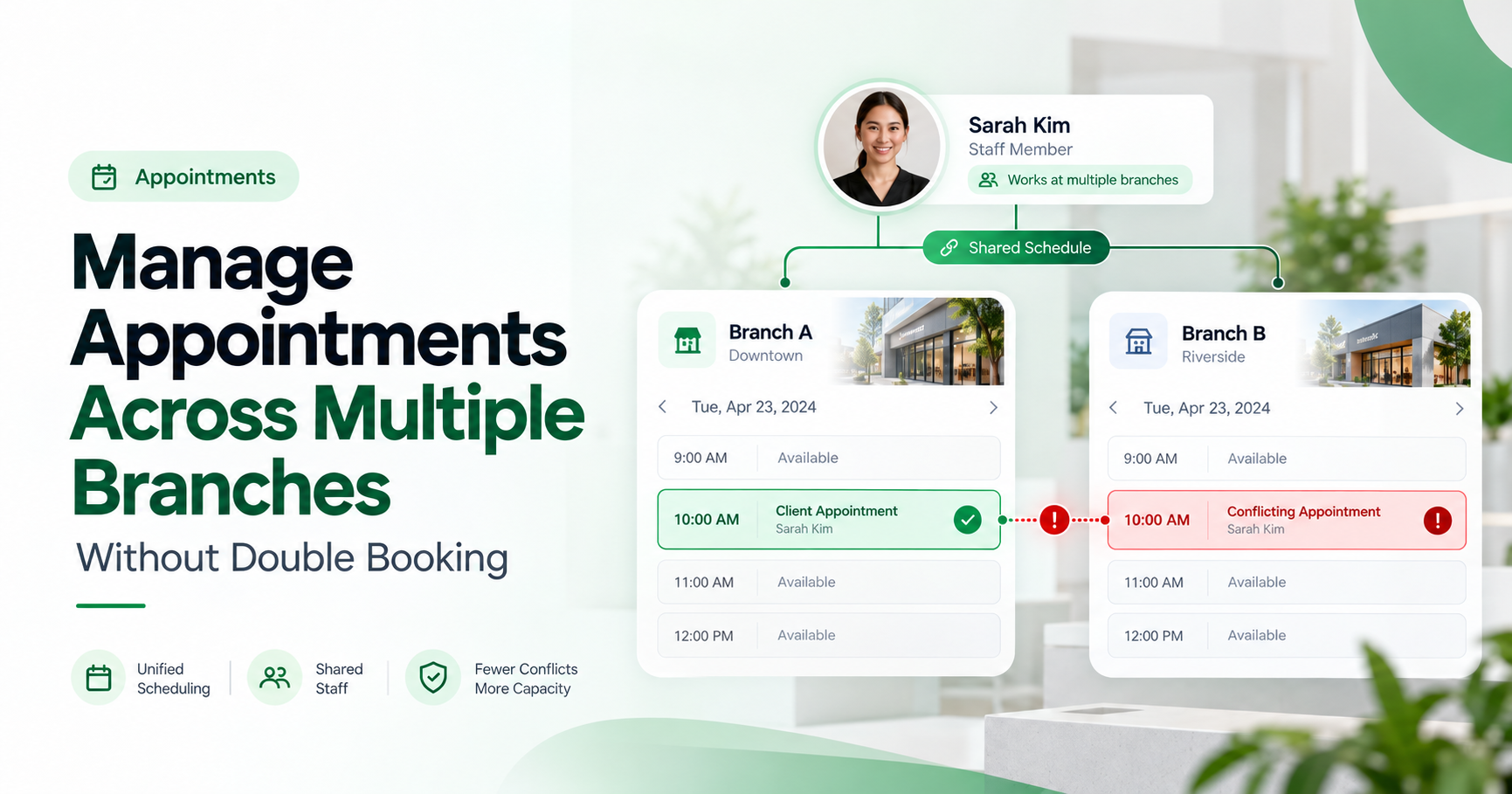
Managing appointments across multiple branches becomes difficult when teams use separate calendars, share employees or accept bookings through different channels. A slot that appears available at one location may already be occupied by an appointment elsewhere.
A practical way to reduce double-booking risk is to review branch availability, employee schedules and required resources together, then check for conflicts before confirming an appointment. Each booking should identify the correct location, responsible employee, appointment duration and any required room or equipment.
This approach helps businesses coordinate appointments without making customers responsible for internal scheduling problems.
What Is Double Booking in a Multi-Branch Business?
Double booking occurs when two or more appointments are assigned to the same employee, room, equipment or other limited resource during overlapping periods, without sufficient capacity to fulfil them.
However, two appointments taking place at the same time are not automatically double bookings.
For example, a dental clinic may legitimately schedule two patients at 10:00 am if separate dentists and treatment rooms are available.
The problem arises when both patients are assigned to the same dentist or require the same treatment room.
For businesses operating multiple branches, conflicts can also occur when an employee works at more than one location.
A consultant cannot conduct an appointment at Branch A and another at Branch B simultaneously, even when both branch calendars show an empty slot.
The essential distinction is between available time and available capacity.
A calendar can show that an hour is open, but the business must also confirm that the people and resources needed to deliver the service are available.
Why Do Double Bookings Happen Across Multiple Branches?
Multi-location scheduling conflicts usually originate from incomplete information rather than deliberate mistakes.
1. Every branch maintains a separate calendar
When branches maintain independent calendars, receptionists may know what is booked locally but cannot see appointments assigned to shared employees at other locations.
For example, a consultant who works at two branches could accidentally receive two appointments at the same time.
2. Staff members work at multiple locations
Employees may rotate between branches, visit clients or support another office during busy periods.
If their availability is not updated across locations, a branch may offer an appointment while that employee is working elsewhere.
3. Online and telephone bookings are recorded separately
Customers may book through a website, call reception or request an appointment through a messaging channel.
If employees maintain one system while the website uses another, the same slot can appear available in both places.
4. Appointment durations are not consistent
Not every service requires the same amount of time.
An introductory consultation may take 20 minutes, while a detailed assessment requires 60 minutes.
Scheduling every appointment in identical time blocks can create overlaps and insufficient preparation time.
5. Rescheduling does not update the original booking
An appointment transferred from one branch to another may remain active in the original calendar.
This can reserve capacity unnecessarily, leave duplicate active bookings or confuse employees about which appointment is valid.
How to Manage Appointments Across Multiple Branches: 7 Practical Steps
Step 1: Define the availability of every branch
Start by recording the working arrangements for each business location.
Include:
Branch name and address
Opening hours and weekly holidays
Services available at that location
Employees authorised to provide each service
Rooms or equipment required
Maximum simultaneous appointment capacity
A branch that closes at 6:00 pm should not accept a 60-minute appointment beginning at 5:30 pm unless the business has explicitly allowed that arrangement.
The same principle applies to services that require preparation, cleaning or handover time.
Step 2: Maintain one availability record for every employee
An employee working across several branches should have one authoritative availability record that considers all their commitments.
Suppose a senior consultant works at Branch A in the morning and Branch B in the afternoon.
Their schedule might look like this:
Time | Employee availability |
|---|---|
9:00 am–12:00 pm | Branch A |
12:00 pm–1:00 pm | Unavailable for travel |
1:00 pm–5:00 pm | Branch B |
If somebody tries to book the consultant at Branch B at 11:00 am, the request should be treated as a conflict.
The schedule must consider the employee's availability across all branches, not just the calendar for the selected location.
Where staff use external calendars, make sure the scheduling process checks the relevant busy times. Google's appointment scheduling documentation, for example, explains why additional host calendars need to be included in availability checks.
Step 3: Define appointment types, durations and required resources
Different services place different demands on employees and facilities.
For each appointment type, define the expected duration, suitable staff, location restrictions and required resources.
For example:
Appointment type | Duration | Resource requirement |
|---|---|---|
General consultation | 30 minutes | Available consultant |
Detailed assessment | 60 minutes | Specialist and meeting room |
Follow-up appointment | 20 minutes | Assigned employee |
Equipment-based service | 45 minutes | Qualified employee and equipment |
These are illustrative durations. Every business should configure its own scheduling rules.
A business should also consider preparation, cleaning and travel buffers.
If an appointment ends at 11:00 am but the room requires 15 minutes of preparation before the next customer, that room should not become bookable until 11:15 am.
Step 4: Establish one source of truth for bookings
One of the most effective operational improvements is to decide where confirmed appointment information is maintained.
Ideally, online booking, reception bookings, telephone appointments and approved manual entries should update the same authoritative scheduling record.
Staff should not need to compare several spreadsheets or personal calendars to determine whether an appointment is confirmed.
Every booking should contain:
A unique booking reference
Customer name and relevant contact information
Branch and appointment location
Assigned employee
Start time, end time and time zone
Required resources
Booking status
If several systems are connected, verify how quickly updates are synchronised and what happens when a connection fails.
A shared calendar is helpful, but synchronisation delays can still create conflicts.
Step 5: Check capacity and conflicts before confirming
A bookable slot should satisfy all the essential conditions:
Branch open + employee available + required resources available + sufficient appointment duration and buffer + permitted capacity.
The scheduling process should check those conditions when the booking is confirmed, not only when the customer first opens the booking page.
This matters because two people may attempt to reserve the same slot at almost the same moment.
A reliable booking system should verify availability and reserve the required capacity as one controlled operation. Otherwise, two requests could both pass an earlier availability check.
If your current software cannot reliably prevent such conflicts, introduce a temporary review or confirmation process rather than treating every requested slot as confirmed.
Step 6: Set rules for rescheduling, transfers and cancellations
Customers change plans, and businesses sometimes need to move appointments between branches.
A transfer should update the existing appointment rather than create a second active booking.
For example, if a customer moves a consultation from Branch A to Branch B, the process should:
Check whether Branch B has an appropriate employee and available resources.
Confirm the new appointment time.
Release the original reservation.
Update the appointment's location and responsible employee.
Communicate the confirmed change to the customer and affected staff.
The business must decide how to handle unsuccessful transfers so that it does not accidentally lose a valid booking.
Cancellations should also release capacity promptly, with appropriate records retained for operational reporting.
Step 7: Review conflicts and branch performance regularly
Even a well-designed scheduling process requires oversight.
Managers should review how often appointments are changed because of conflicts, whether bookings arrive through unconnected channels and which branches experience repeated capacity problems.
Useful performance measures include:
Confirmed double-booking incidents: Actual appointments that could not be fulfilled because of conflicting allocations.
Conflict detection rate: Booking attempts flagged for an overlap divided by total booking attempts.
Conflict-related rescheduling rate: Confirmed appointments moved because of resource or employee conflicts.
Branch utilisation: Booked service capacity compared with available service capacity.
No-show rate: Missed appointments compared with scheduled appointments, using a consistent definition.
A zero-conflict report is not necessarily proof of perfect scheduling. It could also mean conflicts are not being recorded.
The aim is to identify problems early and understand why they happen.
Example: Two Branches, One Shared Consultant
Consider a hypothetical professional services business with two offices: City Centre and North Branch.
A senior consultant provides appointments at both locations.
On Monday, their approved schedule is:
City Centre: 9:00 am–12:00 pm
Travel and preparation: 12:00 pm–1:00 pm
North Branch: 1:00 pm–5:00 pm
A customer books a 45-minute consultation at City Centre beginning at 10:30 am.
The appointment finishes at 11:15 am. With a 15-minute follow-up buffer, the consultant remains unavailable until 11:30 am.
At 10:35 am, another customer tries to schedule an 11:00 am appointment with that same consultant at North Branch.
The North Branch calendar may show an empty room. However, the consultant is already committed at City Centre, and travel time has not been accounted for.
The correct scheduling decision is to reject that combination of employee, branch and time, then offer an alternative.
The business might provide an appointment with another qualified employee at North Branch or offer a suitable time after 1:00 pm.
This protects both customer commitments without necessarily reducing overall branch capacity.
Which Overlapping Appointments Are Actually Conflicts?
A useful scheduling policy distinguishes genuine resource conflicts from legitimate parallel appointments.
Situation | Scheduling decision |
|---|---|
Two customers, same employee, overlapping times | Conflict — change the time or employee |
Two customers, different qualified employees and available rooms | Can be valid |
Two employees, one room required by both appointments | Conflict — reassign a room or time |
Same employee at different branches without sufficient travel time | Conflict |
Two customers intentionally booked for a permitted group session | Can be valid when capacity allows |
Manager attempts to override a warning | Review employee, resource and customer impact first |
A hard booking restriction is appropriate when an overlap is physically impossible.
An authorised exception may be appropriate when the team confirms that enough capacity exists.An override should not be used to accept two commitments that the same employee or exclusive resource cannot physically fulfil. Any exception should be reviewed against actual available capacity.
TrueValue Platform's related article on appointment overlap warnings explains why warnings and intentional overrides should be handled carefully.
What Should You Look for in Multi-Branch Appointment Scheduling Software?
Before choosing a scheduling system, test it using realistic situations from your business.
Ask these questions:
Can each branch maintain its own opening hours and service availability?
Can the same employee's bookings be checked across different branches?
Can the software account for rooms, equipment and simultaneous booking capacity?
Are manual and online bookings checked against the same availability information?
What happens if two customers select the last available slot simultaneously?
Does rescheduling release the original reservation and update the new branch?
Can different employees have appropriate permissions to manage appointments?
Can managers review bookings, cancellations, conflicts and appointment outcomes?
Do not rely solely on a feature checklist.
During a demonstration, deliberately try to book the same employee at two locations, reserve an occupied resource and reschedule an appointment while another booking is being made.
The outcome of these tests is more informative than the mere presence of a shared calendar.
How TrueValue Appointments Fits Into Structured Scheduling
TrueValue Platform provides purpose-built business Products, including TrueValue Appointments, which focuses on business booking, staff availability, scheduling and appointment workflows.
For businesses operating multiple locations, the important requirement is to manage appointments according to real employee and branch capacity rather than relying on isolated calendar entries.
When evaluating TrueValue Appointments, businesses can discuss their branch structure, booking requirements, staff availability and conflict-handling needs during a tailored demonstration.The branch, resource-capacity and conflict-handling examples in this guide describe general scheduling practices. Businesses should verify the specific workflows and configurations available in TrueValue Platform Appointments during their Product evaluation
That discussion should establish which specific multi-branch workflows are supported and how they would be configured for the organisation.
Request a TrueValue Platform Demo →
Frequently Asked Questions
Can two customers book appointments at the same time in one branch?
Yes, provided the branch has enough suitable employees, rooms and other resources to fulfil both appointments. Simultaneous appointments are not necessarily double bookings.
How can businesses prevent one employee from being booked at two branches?
Maintain a single authoritative availability record for the employee across all branches. Include appointments, leave, travel time and other unavailable periods in the conflict check before confirming new bookings.
Is a shared calendar enough to prevent double booking?
Not always. A shared calendar improves visibility, but the booking process must also account for staff, resource capacity, service duration, synchronisation delays and simultaneous reservation attempts.
Can Google Calendar help prevent booking conflicts?
Google Calendar appointment schedules can check selected calendars for busy periods, subject to account and configuration requirements. However, shared employees, co-host calendars and multi-location resources still require the correct availability settings and operational rules.
What is the difference between a booking conflict and a no-show?
A booking conflict occurs when appointments compete for unavailable staff or resources. A no-show occurs when a customer fails to attend an appointment that was scheduled. They are different operational problems and should be measured separately.
Should a business use separate booking links for each branch?
Separate links can make location selection clearer, but they are not a conflict-prevention mechanism by themselves. All relevant links should rely on consistent availability and resource information, especially when employees work across locations.
Final Thoughts: Manage Capacity, Not Just Calendar Slots
Managing appointments across multiple branches is ultimately a capacity-management problem.
A branch may have an empty room but no qualified employee. A staff member may appear free locally while already booked at another location. A website may show an available slot that reception has just reserved.
A reliable scheduling process must account for all these possibilities before confirming a customer commitment.
The practical starting point is straightforward: define branch availability, maintain accurate staff schedules, establish one booking record, check required resources and introduce clear rules for conflicts and rescheduling.
As the business grows, these controls create a more dependable appointment experience for customers and a more manageable workflow for employees.
Want to explore a more structured appointment process for your business?
See Appointment and the rest of the Platform in action.
Start with the Product you need today, then add more on the same Platform.
Request a Demo