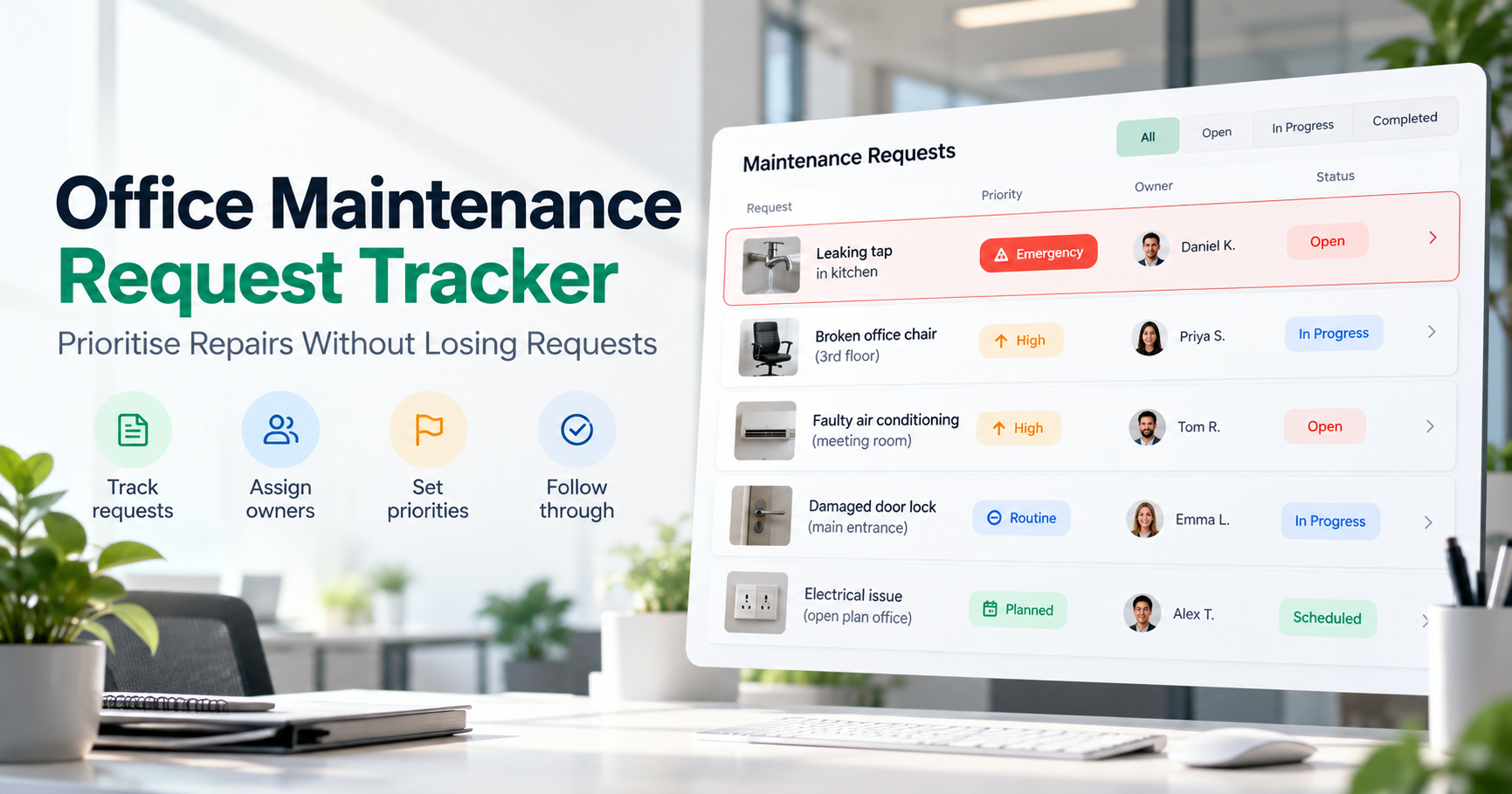
A broken office chair, a leaking tap, a damaged door lock and a faulty air-conditioning unit may all be reported on the same day.
But which problem should the maintenance team address first?
And how can managers make sure the remaining requests are not forgotten?
An office maintenance request tracker helps businesses record repair problems, assign responsibility, prioritise urgent work and follow each request until it is resolved. A practical process uses a central request record, clear priority rules, responsible owners and regular status reviews.
The goal is not simply to record what is broken. It is to make sure every reported issue leads to an appropriate action.
What Is an Office Maintenance Request Tracker?
An office maintenance request tracker is a structured record used to manage repairs, equipment faults, cleaning issues and other facility maintenance work.
It shows what has been reported, where the problem exists, how urgent it is, who is responsible and what needs to happen next.
For a small office, the tracker might begin as a spreadsheet.
For a growing organisation with multiple locations, a dedicated office operations system may provide a more suitable way to coordinate maintenance activities.
Regardless of the software used, the important questions remain the same:
What needs to be repaired?
Is anyone's safety at risk?
Where is the problem located?
Who is responsible for the next action?
When should the request be reviewed?
Has the problem actually been resolved?
If the team cannot answer these questions, the maintenance process lacks essential visibility.
Why Do Office Maintenance Requests Get Lost?
Maintenance requests can become difficult to follow when information is scattered, even when employees have reported problems responsibly.
They become difficult to follow when information is scattered.
An employee might report a broken chair through WhatsApp. A receptionist may email the office administrator about a leaking tap. Another employee might verbally inform someone that the meeting room air conditioner is not working.
Each person believes the issue has been reported.
But reporting a problem is not the same as assigning responsibility for resolving it.
Four common process failures make matters worse.
1. Requests arrive through different channels
Emails, calls, messages and verbal conversations create separate records of the same office.
When nobody maintains a central list, it becomes difficult to see which requests remain open.
2. Nobody owns the next action
A request may be acknowledged without being assigned to a responsible employee.
The facilities team assumes administration will handle it. Administration assumes somebody has contacted the vendor.
The request remains open without meaningful progress.
3. Every request is treated as equally urgent
A broken light in an unused storage area should not automatically receive the same priority as a serious electrical hazard.
Without consistent priority rules, maintenance work can be driven by whoever follows up most frequently.
4. Requests are marked complete too early
A vendor has been contacted.
A replacement part has been ordered.
A technician has inspected the issue.
These are progress updates, not necessarily completed repairs.
A request should be marked as resolved only after the required work has been completed and appropriately checked. Requests that are cancelled, invalid or duplicates should have a separate recorded closure reason
How to Track Office Maintenance Requests in 6 Steps
Step 1: Record Every Maintenance Request in One Place
Create a standard process for recording office maintenance problems.
Every request should contain enough information for the responsible person to understand the issue without repeatedly contacting the employee who reported it.
A practical maintenance request record should include:
Field | Information to record |
|---|---|
Request ID | Unique reference number |
Date reported | When the issue was raised |
Office location | Branch, floor, room or area |
Issue description | What is broken or not working |
Asset or equipment | Equipment identifier, if relevant |
Priority | Emergency, High, Routine or Planned |
Assigned owner | Person coordinating the repair |
Status | Current progress |
Next action | What must happen next |
Review or target date | When progress must be checked |
Resolution evidence | Repair notes or confirmation |
The emergency entry is shown for recordkeeping only. Immediate hazards must trigger the organisation's emergency response procedures without waiting for request assignment, routine approval or a scheduled tracker review.Photographs may help employees explain the issue, particularly when reporting damaged equipment or fixtures.
Keep sensitive employee details and security-related information accessible only to appropriately authorised people.
Practical rule: Every request needs a reference number and a next action, even when it cannot be repaired immediately.
Step 2: Prioritise Repairs Based on Safety and Business Impact
Not all office maintenance requests require the same response.
A useful priority framework considers the potential safety risk, operational disruption and consequences of waiting.
For example:
Priority | Meaning | Example |
|---|---|---|
P0 — Emergency | Immediate danger or a serious safety incident | Electrical sparks, suspected gas leak or severe flooding |
P1 — High | Significant disruption or an issue likely to worsen | Failed essential air conditioning, damaged access door or worsening leak |
P2 — Routine | Limited operational impact; repair can be scheduled | Broken chair or minor fixture fault |
P3 — Planned | Non-urgent improvement or cosmetic maintenance | Repainting an office wall |
These are example classifications, not universal response-time standards. Organisations should define their policies according to the actual risk, workplace conditions and applicable requirements.
Safety-related emergencies should never wait in an ordinary software queue. Employees should follow the organisation's emergency procedures, restrict unsafe access where appropriate and contact qualified responders.
Safe Work Australia recommends an ongoing process of identifying hazards, assessing risks, implementing controls and reviewing their effectiveness. Its workplace risk-management guidance provides a useful foundation for safety-related decisions.
Step 3: Assign a Responsible Owner
Every maintenance request should have one person accountable for coordinating its progress.
That person does not necessarily need to perform the repair.
For example, an office administrator may own an air-conditioning repair request while a qualified external technician performs the work.
The administrator's responsibility is to coordinate the process:
Review the reported issue.
Determine the appropriate priority.
Contact the responsible maintenance employee or vendor.
Agree on the next action.
Track progress and delays.
Confirm that the repair has been completed.
This prevents requests from becoming shared responsibilities that nobody actually manages.
Step 4: Track the Request Through Clear Statuses
A maintenance tracker should show more than whether something is open or closed.
A practical status workflow could be:
Received → Under Review → Assigned → In Progress → Resolved → Verified and Closed
Some requests may also require a separate status such as:
Waiting for vendor
Waiting for spare parts
Waiting for approval
Waiting for site access
The status should describe what is actually happening.
For example, if a vendor has not yet provided a replacement part, marking the job as complete would create misleading information.
Instead, record that the request is waiting for parts, identify who must follow up and set a date to review progress.
The key rule is simple:
A waiting request still needs an owner and a next action.
Step 5: Prevent Duplicate and Forgotten Requests
Suppose three employees report the same leaking tap.
Without a consistent tracking process, the office administrator might create three separate repair requests.
This can lead to unnecessary follow-up, repeated vendor communication and confusion about which issue has been resolved.
Before creating another maintenance job, check whether the same asset, location and problem already have an active request.
Where appropriate, connect additional reports to the existing request while preserving any important new details.
Do not delete distinct safety incidents or required records merely because they concern the same asset.
Managers should also review requests that have not received meaningful updates.
An assigned request that has remained unchanged for several days may need attention even when its target completion date has not passed.
For a related operational approach, see How to Spot Tasks That Have Stopped Moving.
Step 6: Verify the Repair Before Closing the Request
Contacting a vendor does not mean a repair has been completed.
Completing a technician visit does not always mean the original issue has been resolved.
Before closing a maintenance request, confirm:
The reported issue has been addressed.
The equipment or facility is safe to use, where applicable.
Any required checks or inspections are complete.
The responsible employee has recorded the outcome.
Relevant repair costs and vendor details are documented.
The requester or authorised person has been informed.
For complex repairs, photographs, test results or specialist sign-off may be appropriate.
If the problem continues, reopen or follow up on the existing request rather than recording a misleading resolution.
Example: A Simple Office Maintenance Request Tracker
Consider a hypothetical company managing maintenance requests across two offices.
Its tracker might look like this:
Request | Reported issue | Priority | Current status |
|---|---|---|---|
OM-101 | Electrical sparking near workstation | P0 — Emergency | Emergency response initiated |
OM-102 | Leaking washroom tap | P1 — High* | Vendor visit pending |
OM-103 | Broken employee chair | P2 — Routine | Assigned for replacement |
OM-104 | Meeting room repainting | P3 — Planned | Scheduled for later |
The leaking tap is classified as High in this example because the leak is worsening and could cause damage. A minor drip without that risk might be Routine.
The office administrator should also be able to identify each request's owner, next action and review date.
This small change turns the maintenance list into a working operational record.
Instead of asking, "Did somebody tell the maintenance team?", a manager can ask:
"Who owns this request, what is its current status and what happens next?"
That is the difference between collecting complaints and managing repairs.
How to Review Office Maintenance Requests Without Endless Meetings
A short daily review can help managers identify problems before they become overdue.
The review should focus on four groups:
New requests
Check whether every new report has been reviewed, prioritised and assigned.
Emergency and high-priority requests
Confirm that immediate safety measures and necessary escalation procedures have been followed.
Waiting or blocked requests
Identify which repairs are waiting for vendors, materials, approvals or access.
Requests ready for closure
Check whether the work is genuinely complete and whether the required evidence has been recorded.
For larger organisations, a weekly review can also examine recurring equipment failures and maintenance patterns.
If the same air-conditioning unit requires repeated repairs, the next decision may involve evaluating maintenance history and replacement options rather than repeatedly treating the problem as an isolated incident.
Which Maintenance Metrics Should Office Managers Track?
A good maintenance report should make operational problems visible without encouraging employees to close requests prematurely.
Useful measures include:
Open maintenance requests: The number of unresolved issues.
Emergency and high-priority backlog: Important requests still awaiting resolution.
Time to acknowledge: How long the team takes to recognise and begin responding to a request.
Time to resolution: The elapsed time between a reported issue and verified completion.
Overdue requests: Repairs that have passed their agreed target dates.
Repeat maintenance issues: Problems that return for the same location or asset.
Track acknowledgement and repair completion separately. A quick response is valuable, but it is not proof that the work has finished.
These measures can help managers identify where process improvements, vendor follow-up or maintenance investment may be needed.
When Should a Business Move Beyond a Maintenance Spreadsheet?
A spreadsheet can be a practical starting point for a small office with limited repair requests.
However, manual tracking may become harder when a business has several locations, multiple vendors, shared maintenance staff or a large number of active requests.
Common warning signs include:
Employees repeatedly asking for repair updates.
Duplicate requests for the same issue.
Unclear responsibility between teams.
Repairs waiting for vendor action without follow-up.
Difficulty understanding maintenance spending.
Limited visibility across office locations.
Before selecting software, evaluate how it handles the real maintenance lifecycle: reporting, prioritisation, ownership, vendor coordination, resolution and review.
The aim is not merely to replace a spreadsheet with a different screen. It is to establish a process employees can reliably follow.
How TrueValue Office Manager Fits Into Office Operations
TrueValue Platform offers Office Manager, a business Product focused on everyday office operations.
Its scope includes people, assets, inventory, services and requests, and vendor and purchase operations.
For businesses seeking a more structured approach to office maintenance, these areas are relevant to understanding equipment, coordinating repairs and managing operational responsibilities.
Organisations can explore how their own request intake, repair priorities, vendor follow-ups and approval requirements fit into Office Manager during a Product demonstration.
The important step is to validate the exact workflow for the organisation rather than assume every requested configuration is available.
Want to explore a more organised approach to everyday office operations?
Request a Demo of TrueValue Platform →
Frequently Asked Questions
What is an office maintenance request tracker?
An office maintenance request tracker is a structured record of repair issues, locations, priorities, assigned owners, progress updates and resolution details. It helps businesses coordinate office maintenance requests and keep unresolved work visible.
How should office repair requests be prioritised?
Prioritise repairs according to safety risk, operational impact and the consequences of delay. Emergencies should follow immediate response procedures. High-priority disruptions should receive prompt attention, while routine and cosmetic work can be scheduled appropriately.
What is the difference between a maintenance request and a work order?
A maintenance request reports a problem or need. A work order authorises or directs the work required to address it, typically specifying responsibility, scope and relevant execution details. Some systems use one record to manage both stages.
Who should be responsible for office maintenance requests?
An office administrator, facilities manager or designated operations employee should own the coordination process. Qualified internal staff or external vendors may carry out the repair itself.
Can an Excel spreadsheet be used as a maintenance tracker?
Yes. A spreadsheet can record request IDs, locations, priorities, owners, statuses and follow-up dates. As request volume increases, businesses may need stronger processes for updates, permissions, duplicate reports and coordination across locations.
How can office managers prevent maintenance requests from being forgotten?
Use one authoritative request list, assign every request a responsible owner, record the next action, review waiting requests regularly and confirm completion before closing the record.
Final Thoughts
Office maintenance management should not depend on who sends the most reminders.
A leaking tap, broken chair or faulty air conditioner should have a clear place in the maintenance process, with a priority, an owner and a visible next step.
The most useful office maintenance request tracker is not necessarily the one with the most features.
It is the one that helps the team answer three questions consistently:
What needs attention? Who is responsible? What happens next?
When those answers remain visible, businesses can manage repairs more deliberately and reduce the risk of important requests being overlooked.
Explore a More Structured Office Management Process — Request a Demo
See Business Operations and the rest of the Platform in action.
Start with the Product you need today, then add more on the same Platform.
Request a Demo