AI agents are changing how businesses manage customer relationships. From generating email responses to recommending follow-ups and updating customer records, AI-powered CRM tools can help employees complete repetitive work more efficiently.
But what happens when an AI agent makes a mistake?
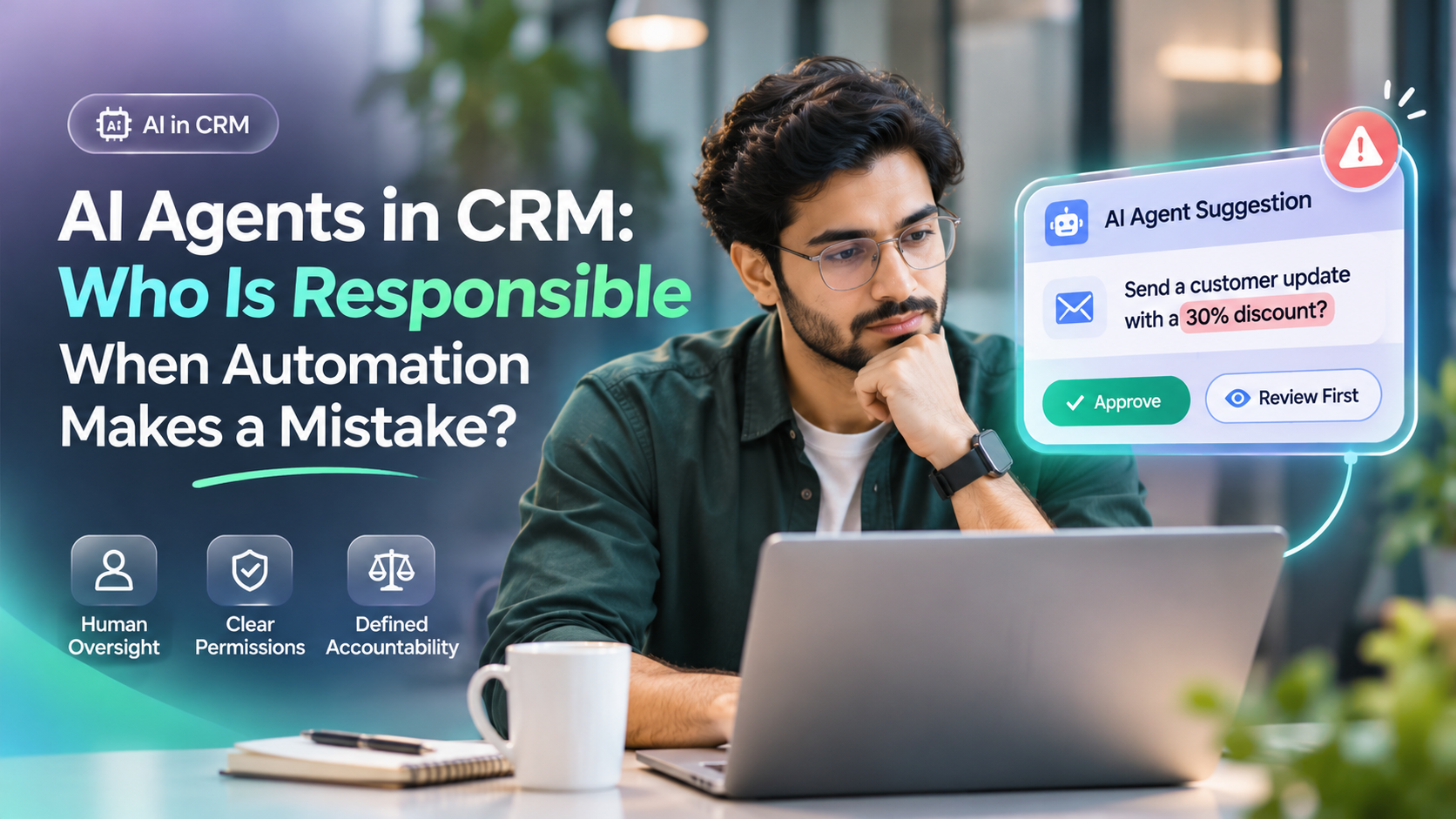
Imagine an AI-generated message promises a customer an incorrect discount, or an automated workflow assigns an important lead to the wrong employee.
Who is responsible: the AI provider, the CRM administrator, the salesperson or the business?
AI agents can automate tasks, but responsibility for customer outcomes requires human oversight, clear permissions and defined accountability. Legal liability depends on the circumstances and applicable law.
Understanding these responsibilities helps businesses use AI without losing control of important customer interactions.
What Are AI Agents in CRM?
AI agents are software systems that use artificial intelligence to analyse information, recommend actions or carry out tasks within defined workflows.
Unlike traditional automation, which usually follows predefined rules, some AI agents can interpret context and determine their next steps within permitted boundaries.
Common CRM use cases include:
Generating customer email drafts.
Summarising conversations and meetings.
Identifying leads that need attention.
Suggesting follow-up activities.
Assisting with lead qualification.
Recommending sales priorities.
Updating authorised customer information.
For example, a salesperson might use an AI assistant to summarise a customer conversation and prepare a follow-up email.
However, AI-generated information is not automatically accurate. Even useful systems can misunderstand context, produce incorrect details or act on incomplete data. Not every AI feature is an autonomous agent. An AI assistant may draft a message for an employee to review, while an agent may be configured to choose and execute permitted actions. Traditional automation can also perform tasks using predefined rules without AI. The distinction matters because the level of oversight should reflect what the system is authorised to do.
What Happens When an AI Agent Makes a Mistake?
AI mistakes can affect customer relationships, employee productivity and business operations.
Consider these examples.
AI Mistake | Possible Business Impact |
|---|---|
Incorrect email response | Customer receives misleading information |
Wrong lead assignment | Enquiry reaches the wrong employee |
Inaccurate customer summary | Salesperson makes decisions using incorrect context |
Duplicate follow-up message | Customer receives repeated communication |
Incorrect CRM record update | Customer information becomes unreliable |
Unauthorised data disclosure | Privacy or security risk |
Not every mistake carries the same level of risk.
An incorrect internal summary may require editing. An unauthorised customer promise, financial change or disclosure of sensitive information may require urgent escalation.
The more significant the consequences, the stronger the controls should be.
Who Is Responsible for AI Mistakes in CRM?
There is no universal rule that automatically makes one person responsible for every AI error.
Operational responsibility should be assigned across the people who configure, manage and use the system.
1. Business Owners and Management
Management is responsible for establishing organisational policies around AI use.
This includes deciding which activities AI may perform, which require approval and how serious incidents are handled.
Businesses should also ensure that employees understand the limitations of AI-assisted workflows.
2. CRM Administrators
CRM administrators typically manage system settings, user permissions and workflow configurations.
Their responsibilities may include defining which records an AI agent can access and what actions it can perform.
However, administrators should not be held automatically responsible for every AI-generated mistake simply because they configured the system.
3. Employees Using AI
Employees remain responsible for following company procedures.
For example, if a salesperson must review an AI-generated quotation before sending it, that approval process should not be skipped.
Employees should also report inaccurate outputs and unexpected behaviour.
4. AI and Software Providers
Software providers have responsibilities relating to the systems they develop and the commitments they make.
The exact obligations depend on the product, applicable laws, contractual terms and the provider's role.
Businesses should evaluate vendor documentation, limitations, security controls and available support procedures.
The practical objective is shared responsibility with clearly identified decision-makers—not a situation where everyone assumes someone else is accountable.
Real Example: AI Sends Incorrect Pricing to a Customer
Consider a fictional software business using an AI-assisted CRM workflow.
A customer asks about the price of a subscription.
The AI generates a response offering a 30% discount, even though the company has not authorised that offer.
The customer replies, expecting the discounted price.
The business now has a problem.
Instead of blaming the AI alone, the team should investigate:
Was the AI allowed to send pricing messages without approval?
Was the correct pricing information available?
Did an employee review or approve the response?
Was the message generated from outdated information?
What correction or remedy does the customer require?
A sensible response would involve reviewing the communication, clarifying the correct offer and identifying which control failed.
For future messages, the company might require human approval for discounts, refunds and contractual commitments.
The lesson is simple: AI should not have unlimited authority to make business promises.
Human-in-the-Loop vs Fully Automated CRM
One important decision is how much independence an AI agent should receive.
Human-in-the-Loop Automation
The AI prepares an action, but an employee approves it before execution.
Examples include approving customer quotations, reviewing sensitive communications and confirming major changes to customer records.
This approach offers greater control but requires employee involvement.
Fully Automated Workflows
The AI performs an authorised action without requiring approval each time.
Examples might include categorising routine enquiries or creating internal follow-up suggestions, depending on system permissions.
Automation can reduce repetitive work, but errors may propagate if controls are insufficient.
Which Approach Is Better?
A risk-based approach is generally more practical than treating every AI action identically.
Activity | Suggested Control |
|---|---|
Draft internal summary | Human review as needed |
Suggest follow-up task | Review based on workflow |
Send routine acknowledgement | Controlled automation |
Change customer ownership | Authorised rules and audit trail |
Offer discount or refund | Human approval |
Delete customer records | Strong permissions and confirmation |
Share sensitive information | Strict access and disclosure controls |
These are recommended governance choices, not universal legal requirements. For sensitive changes, approval should be linked to the exact proposed action. The system should independently confirm that the action is permitted, rather than relying only on an AI-generated recommendation or a general approval setting.
How to Prevent AI Mistakes in CRM
Businesses can reduce risk by establishing practical safeguards before allowing AI agents to perform customer-facing actions.
1. Define AI Permissions
An AI agent should access only the information and actions necessary for its assigned purpose.
For example, an assistant that drafts emails may not need permission to delete customer records.
2. Set Approval Requirements
High-impact actions should require explicit authorisation.
These may include pricing commitments, refunds, sensitive record changes and external communications.
3. Maintain Activity Logs
Where technically supported, record relevant AI actions, approvals, timestamps and affected customer records.
This helps teams investigate incidents and understand how an outcome occurred.
4. Use Reliable Business Information
AI-assisted workflows should use current, approved information.
Outdated pricing, incomplete records and incorrect instructions can produce misleading results.
5. Establish an Escalation Process
Employees should know what to do when an AI agent behaves unexpectedly.
A process should identify who can stop an automation, investigate the incident and communicate with affected customers.
6. Review Performance Regularly
Track recurring mistakes, incorrect recommendations, approval overrides and customer complaints.
Use the findings to improve workflows and permissions.
How AI Mistakes Can Affect Sales Productivity and Revenue
AI-assisted CRM workflows are often introduced to reduce repetitive work. But completing tasks faster is not useful if employees must spend additional time correcting incorrect information, contacting affected customers or reversing unintended changes.
Consider three examples:
AI error | Productivity impact | Potential business impact |
|---|---|---|
Incorrect customer summary | Salesperson must verify or correct the record | Customer requirements may be misunderstood |
Wrong lead assignment | Manager must identify and correct ownership | A sales enquiry may be delayed or overlooked |
Unauthorised pricing message | Team must investigate and correct the communication | Customer trust, deal value or commercial commitments may be affected |
These are potential consequences, not guaranteed outcomes.
What Should Sales Managers Measure?
Before expanding an AI-assisted workflow, establish a baseline and review:
Time spent on routine work: Compare the time needed to complete the same type of task before and after introducing AI.
Correction and rework: Record how often employees must correct inaccurate summaries, customer details or messages.
Approval workload: Track how frequently important AI suggestions require changes before approval.
Follow-up reliability: Review whether leads have clear owners and whether promised customer actions are completed.
Sales progression: Examine whether qualified opportunities continue moving through the pipeline.
For example, if AI reduces the time needed to prepare a customer summary but increases the time required to correct mistakes, the actual productivity benefit may be smaller than expected.
Businesses should also distinguish sales opportunities from realised revenue. An improvement in task completion does not automatically mean more sales or higher profit.
The useful question is not simply how much work AI can perform. It is whether the complete workflow helps employees spend less time on avoidable administration while maintaining accurate customer records and appropriate business controls.
What Should a Business Do After an AI Error?
When an AI mistake occurs, the immediate priority is limiting its impact.
A practical response includes:
Step 1: Identify the affected customer, record or workflow.
Step 2: Pause the relevant automation when continued operation could cause further harm.
Step 3: Preserve appropriate logs and communication history.
Step 4: Correct inaccurate information or records.
Step 5: Notify affected parties when necessary or legally required.
Step 6: Identify the underlying cause and update controls.
Step 7: Verify that the correction works before restoring normal operation.
For significant privacy, security or legal incidents, involve qualified specialists and follow applicable reporting obligations.
How TrueValue CRM Fits Into AI-Assisted Sales Workflows
TrueValue CRM is part of TrueValue Platform's customer relationship management offering.
Its publicly described capabilities include lead management, customer records, sales pipelines, follow-ups and AI-assisted features such as lead scoring, drafting and activity summaries.
These features can support teams managing customer information and everyday sales activities.
Businesses considering AI-assisted CRM should evaluate the available permissions, approval processes, usage limits and audit capabilities for their chosen configuration.
The governance practices discussed in this article are recommended controls, not a claim that every control is automatically implemented in TrueValue CRM.
Frequently Asked Questions
Can an AI agent be legally responsible for its mistakes?
Legal responsibility generally rests with applicable organisations or people rather than automatically being assigned to the AI system itself. The outcome depends on relevant laws, contracts and facts.
Should AI send customer messages without approval?
That depends on the message's risk. Routine communications may be suitable for controlled automation, while pricing promises and sensitive decisions often warrant human approval.
Who should monitor AI activity in a CRM?
Businesses should assign monitoring responsibilities to appropriate employees, administrators or managers according to the workflow's risk and complexity.
Can AI-generated CRM information be inaccurate?
Yes. AI may misunderstand instructions, use incomplete information or generate incorrect details. Important outputs should be verified.
How can businesses maintain accountability?
Use clear permissions, approval requirements, activity records, defined escalation procedures and regular monitoring.
Conclusion: AI Can Automate Work, Not Replace Accountability
AI agents can support sales teams by reducing repetitive work and helping employees manage customer information.
However, businesses should not confuse automation with unlimited decision-making authority.
Clear responsibilities, human oversight, controlled permissions and reliable records help organisations respond appropriately when AI produces an incorrect result.
The goal is not to eliminate human involvement. It is to use human judgement where it matters most.
Explore TrueValue CRM Plans & Pricing to discover available CRM capabilities and evaluate the options for your business.
See AI and the rest of the Platform in action.
Start with the Product you need today, then add more on the same Platform.
Explore Products