Managing customer relationships and scheduling appointments are essential business activities, but they solve different problems. Many businesses use spreadsheets, calendars and messaging apps to handle both, only to discover that important information becomes scattered as their teams grow.
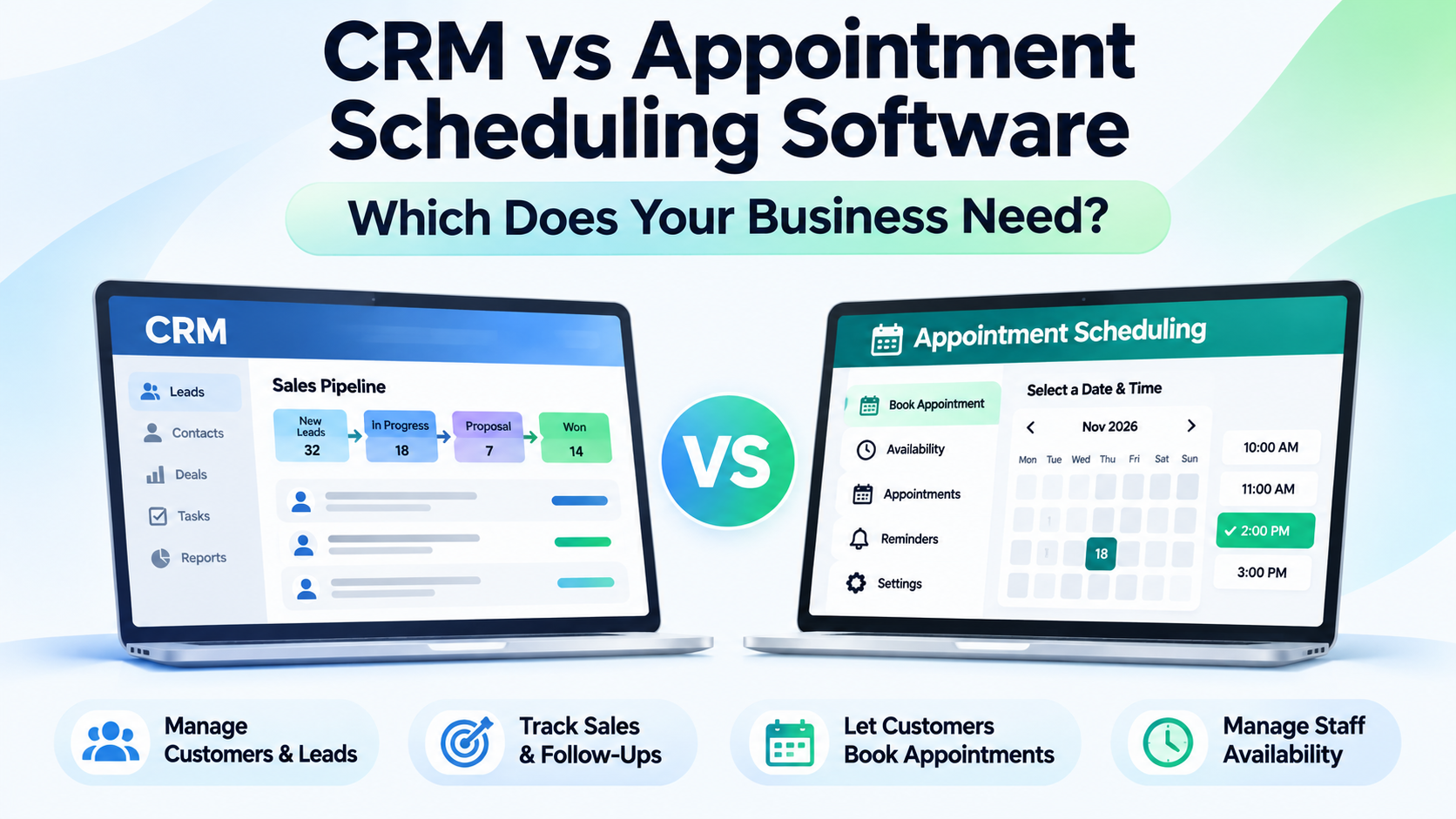
CRM software helps businesses manage customer relationships, leads, sales pipelines and follow-ups. Appointment scheduling software helps customers book meetings while businesses manage staff availability, confirmations and calendars.
The right choice depends on whether your biggest challenge is managing customer relationships, organising bookings or connecting both processes.
What Is CRM Software?
Customer Relationship Management (CRM) software is a system for organising interactions with potential and existing customers.
Instead of storing customer information across spreadsheets, emails and individual employee accounts, a CRM provides a central place to manage relationships and sales activities.
Common CRM capabilities include:
Lead management: Capture, assign and track enquiries.
Contact management: Maintain customer profiles and communication history.
Sales pipelines: Track opportunities through different sales stages.
Follow-up management: Assign tasks, reminders and customer activities.
Reporting: Monitor sales progress and team performance.
Workflow automation: Reduce repetitive administrative work.
For example, a real estate agency receiving enquiries from advertisements can use CRM software to record customer requirements, assign agents and track which prospects are ready to purchase.
The CRM focuses on managing the relationship beyond the initial enquiry.
What Is Appointment Scheduling Software?
Appointment scheduling software helps businesses organise meetings, consultations and service bookings.
Rather than manually exchanging messages to find a suitable time, customers can select available appointment slots based on configured schedules.
Typical features include:
Online appointment booking.
Staff availability management.
Calendar synchronisation.
Automated booking confirmations.
Appointment reminders.
Cancellation and rescheduling options.
Multiple staff or service schedules.
Booking and attendance reports.
For example, a consultancy can allow customers to select available consultation times through an online booking page.
The system helps coordinate the appointment without requiring employees to manually confirm every available slot.
Unlike CRM software, its primary purpose is managing when and how customers meet your team.
CRM vs Appointment Scheduling Software: Key Differences
Although both systems involve customer information, their core responsibilities are different.
Feature | CRM Software | Appointment Scheduling |
|---|---|---|
Primary purpose | Manage customer relationships | Manage bookings |
Lead tracking | Core function | Usually limited |
Customer history | Detailed relationship records | Booking-focused records |
Sales pipeline | Typically included | Usually not included |
Online booking | Varies by product | Core function |
Staff availability | Often limited | Core function |
Appointment reminders | Varies | Common feature |
Sales reporting | Core capability | Usually limited |
Rescheduling | Varies | Common feature |
Best suited for | Sales and relationship teams | Appointment-based teams |
The main difference is simple: CRM manages the customer journey, while appointment scheduling manages the booking journey.
However, modern software can overlap, so businesses should compare actual features rather than relying only on product categories.
When Does Your Business Need CRM Software?
CRM software is generally the better starting point when your business struggles to organise enquiries, manage follow-ups or track sales opportunities.
1. You Receive Leads From Multiple Channels
If enquiries arrive through website forms, advertising campaigns, calls and messages, a CRM can help consolidate customer information.
Without a central system, employees may contact the same prospect repeatedly or overlook important enquiries.
2. Your Sales Process Has Multiple Stages
Some businesses require several interactions before converting a lead into a customer.
For example, a software company may move prospects through enquiry, qualification, proposal, negotiation and purchase stages.
A CRM helps teams monitor this progression.
3. Multiple Employees Manage Customers
When several salespeople handle enquiries, businesses need clear ownership and follow-up responsibilities.
CRM software can help managers identify who is responsible for each lead.
4. You Need Sales Performance Visibility
A CRM is useful when managers need to understand conversion rates, open opportunities and sales activity.
Choose CRM first when your biggest problem is losing track of customers rather than managing appointment times.
When Does Your Business Need Appointment Scheduling Software?
Appointment scheduling software is more appropriate when the business depends heavily on meetings, consultations or time-based services.
1. Customers Frequently Book Appointments
Businesses that receive regular bookings can reduce manual scheduling by providing self-service booking options.
2. Staff Availability Changes Frequently
When employees work different shifts or across multiple locations, appointment scheduling software helps organise available time slots.
3. Double Bookings Cause Problems
Overlapping appointments can disrupt operations and create a poor customer experience.
Availability controls and calendar synchronisation can help reduce scheduling conflicts.
4. Customers Miss Scheduled Meetings
Appointment reminders and confirmations help customers remember upcoming bookings.
5. Rescheduling Takes Too Much Time
Allowing customers to change appointments through a controlled booking process can reduce administrative work.
Choose appointment scheduling first when coordinating bookings consumes more time than managing customer relationships.
Can a Business Use Both CRM and Appointment Scheduling Software?
Yes. Businesses with longer customer journeys and regular appointments may benefit from using both.
Consider a visa consultancy that receives enquiries through its website.
A connected workflow might look like this:
Step 1: Customer enquiry
Rahul submits an enquiry about an Australian visa.
The CRM stores his contact details and enquiry information.
Step 2: Lead assignment
A counsellor receives responsibility for Rahul's enquiry and reviews his requirements.
Step 3: Appointment booking
Rahul selects an available consultation time using appointment scheduling software.
Step 4: Appointment confirmation
The scheduling system records the booking and sends the appropriate confirmation.
Step 5: Consultation
The counsellor meets Rahul and discusses his requirements.
Step 6: Customer follow-up
The CRM records the consultation outcome and tracks any remaining documents or follow-up activities.
In this example, scheduling software manages the appointment while CRM manages the ongoing customer relationship.
When the systems are properly connected, employees can work with consistent information instead of manually copying details between applications.
Which Software Should Different Businesses Choose?
The right starting point varies by business model.
Business Type | Recommended Starting Point |
|---|---|
Sales agency | CRM |
Real estate business | CRM, often with scheduling |
Salon or beauty studio | Appointment scheduling |
Consultancy | Both |
B2B software company | CRM, often with scheduling |
Coaching centre | Scheduling or both |
Recruitment agency | CRM-style relationship management plus scheduling |
Professional services firm | Both, depending on workflow |
These are general recommendations rather than fixed rules.
For example, a small consultancy handling only a few monthly bookings may initially need one system. A larger consultancy managing many enquiries and appointments may benefit from both.
Five Questions to Ask Before Choosing Software
Before purchasing a CRM or scheduling solution, evaluate your business requirements.
What causes the most operational problems?
Identify whether missed leads, poor follow-ups, booking conflicts or manual scheduling are your biggest challenges.
Do customers need multiple interactions before purchasing?
Longer sales cycles usually create a stronger need for CRM.
Do customers regularly book time with employees?
Frequent consultations and service appointments strengthen the case for scheduling software.
Do your teams need shared customer information?
Check whether bookings, customer notes and follow-up activities can be connected.
Can the software grow with your business?
Review user limits, available integrations, permissions, reporting capabilities and pricing.
The goal is to select software that solves existing problems without introducing unnecessary complexity.
Which Problem Is Costing Your Business More Time?
Before choosing CRM or appointment scheduling software, identify where your team is spending unnecessary effort.
If customer enquiries are difficult to manage, review how leads are assigned, how follow-ups are tracked and whether salespeople can find the information needed for the next conversation. CRM software is generally the more relevant starting point.
If employees spend too much time arranging meetings, review the number of messages needed to confirm bookings, availability conflicts, rescheduling work and appointment attendance. Dedicated scheduling software may be more relevant.
If both problems occur, evaluate the complete journey from enquiry to booking, consultation and subsequent follow-up. Determine whether the systems can share the necessary information, or whether staff will need a documented handover process.
For a business owner or manager, useful measures include:
Time spent arranging and changing appointments.
Leads without a clear next action or responsible employee.
Booking and attendance rates.
Customer enquiries that progress to sales opportunities.
Completed sales associated with consultation-based enquiries, where reliable records exist.
These measures help establish whether the main problem is sales coordination, appointment administration or both.
The aim is not to purchase more software. It is to make customer-facing work easier to manage and identify where better processes may support business performance.
How TrueValue Platform Connects CRM and Appointments
TrueValue Platform offers separate Products for customer relationship management and appointment scheduling.
TrueValue CRM focuses on leads, contacts, accounts, deals, customer activity and sales follow-ups.
TrueValue Appointments focuses on online bookings, staff availability, calendar management, appointment reminders and rescheduling.
TrueValue Platform offers CRM and Appointments as separate Products addressing customer relationships and scheduling. Businesses considering both should verify how their specific booking, customer-record and follow-up requirements are supported, including any available connections between the Products.
Businesses can explore each Product according to their requirements and compare available plans before selecting an option.
Specific features, integrations and usage limits may depend on the chosen plan.
Frequently Asked Questions
Can CRM software replace appointment scheduling software?
Sometimes. Certain CRM systems offer meeting scheduling, but they may not provide the specialised availability, staff scheduling and booking controls required by appointment-heavy businesses.
Is appointment scheduling software a CRM?
Not usually. Scheduling software primarily manages bookings, while CRM software manages broader customer relationships and sales activities.
Do small businesses need both?
Not necessarily. Small businesses should start with the software that addresses their most important operational challenge and expand when required.
Can appointment bookings connect to customer records?
Yes, when the systems support integration. Connected workflows can associate appointments with existing customer profiles and reduce duplicate data entry.
Which is better for a consultancy?
A consultancy that manages enquiries, consultations and ongoing follow-ups may benefit from both CRM and appointment scheduling software.
Conclusion: Choose Based on Your Customer Workflow
CRM and appointment scheduling software serve different but complementary purposes.Start with the problem your team needs to solve.
If your business needs better lead tracking, customer management and sales visibility, CRM is usually the stronger starting point.
If your priority is managing appointments, staff calendars and booking confirmations, dedicated scheduling software may be more suitable.
For businesses managing both customer relationships and regular consultations, connected CRM and appointment scheduling systems can provide a more coordinated workflow.
Explore the Products that match your business needs.
Explore TrueValue CRM and TrueValue Appointments, or compare available Products to choose the right starting point.
See Business Operations and the rest of the Platform in action.
Start with the Product you need today, then add more on the same Platform.
Explore Products